Audio - Int Audio Operation Using Steering Wheel Control
# 05-08-44-022: Intermittent Operation of Audio System When Using Steering Wheel Controls (Replace and Modify Air Bag [SIR] Coil Clock Spring) - (Jul 20, 2005)Subject: Intermittent Operation of Audio System When Using Steering Wheel Controls (Replace and Modify Air Bag [SIR] Coil Clock Spring)
Models:
2004 Chevrolet Epica Built Prior to VIN Breakpoint 5B145609 (North American Vehicles)
2004 Chevrolet Epica Built Prior to VIN Breakpoint 4B107408 (Vehicles Outside North America)
Condition
Some customers may comment about the intermittent operation of the audio system when using the steering wheel controls. The following conditions may be present:
^ When the SEEK button is pressed, the radio will change modes intermittently from FM to AM.
^ The radio volume turns off intermittently when the driver attempts to increase the volume.
^ The radio will change stations and shut off by itself.
^ When attempting to change the volume, the mode will change or the radio will turn off.
Cause
This condition may be caused by incomplete grounding on the steering wheel.
Correction
Replace and modify the air bag (SIR) coil clock spring following this procedure:
For Vehicles in North America
1. Remove the SIR coil clock spring. Refer to Inflatable Restraint Steering Wheel Module Coil in SI (Document ID 1560548).
Important:
On some vehicles, an adapter harness may be found placed in-line with the driver side air bag (SIR) clock spring (refer to Corporate Bulletin Number 04-09-41-001). If an adapter harness is found on the vehicle, remove the adapter harness with the clock coil spring. The adapter harness is not to be reused with the new clock spring and should be discarded.
2. Connect the coil clock spring extension wires (P/N 96438826) to the new coil clock spring assembly (P/N 96423643).
Important:
Remove the harnesses to the cruise switch on the steering wheel if the vehicle is not equipped with a cruise control system.
Important:
When installing the coil in the next step, you must take these steps BEFORE re-installing the driver side knee bolster and instrument panel lower cover:
3.1. Install the ground terminal with the knee bolster mounting bracket nut.
3.2. Secure the harness with the instrument panel and air bag harness with a plastic tie strap.
3. Install the SIR coil clock spring. Refer to Inflatable Restraint Steering Wheel Module in SI (Document ID 1560548).
4. Verify that the audio system steering wheel controls function correctly.
For Vehicles Outside of North America
1. Remove the SIR coil. Refer to Inflatable Restraint Steering Wheel Module Coil in SI (Document ID 1560548).
2. Prepare the new coil and 100 mm (4in) of extension harness.
3. Remove the ground connector for the audio steering wheel control switch using a nipper.
4. Peel off the coverings of both ends of the extension harness and the audio switch ground harness about 20mm (0.80 in).
5. Solder the ends of the extension harness and audio switch ground harness.
6. Locate the hot melt tube on the joint point and apply the heat to the hot melt tube.
7. Install the SIR coil. Refer to Inflatable Restraint Steering Wheel Module Coil in SI (Document ID 1560548).
8. Verify that the audio system steering wheel controls function correctly.
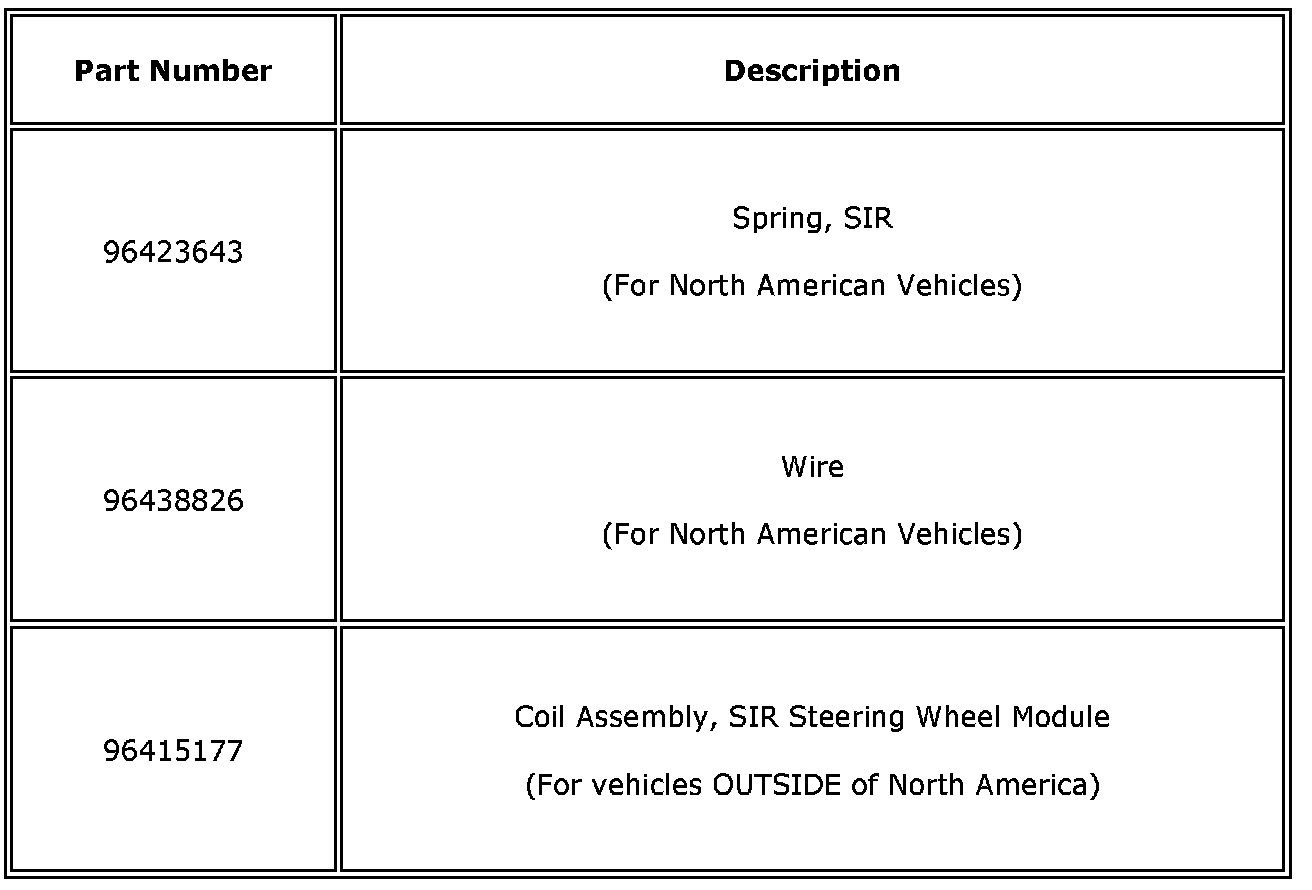
Parts Information
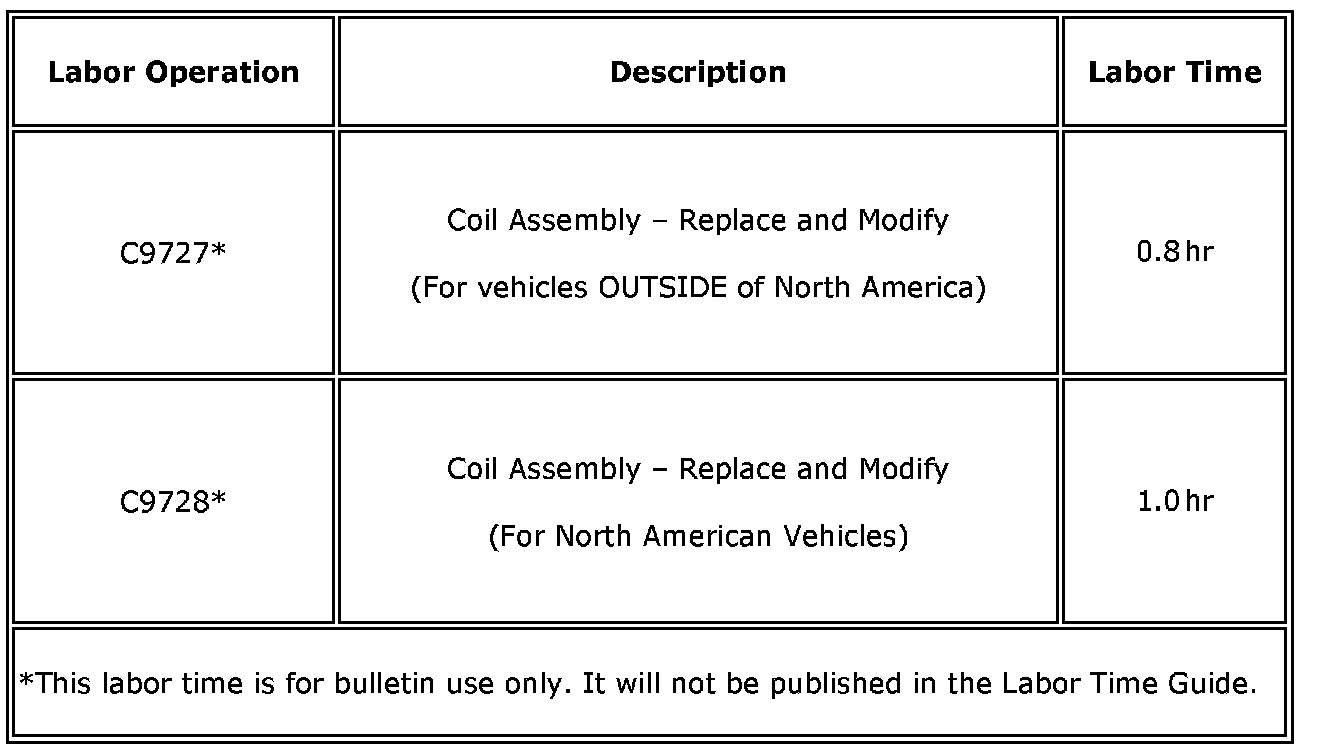
Warranty Information
For vehicles repaired under warranty, use the above chart.

Disclaimer